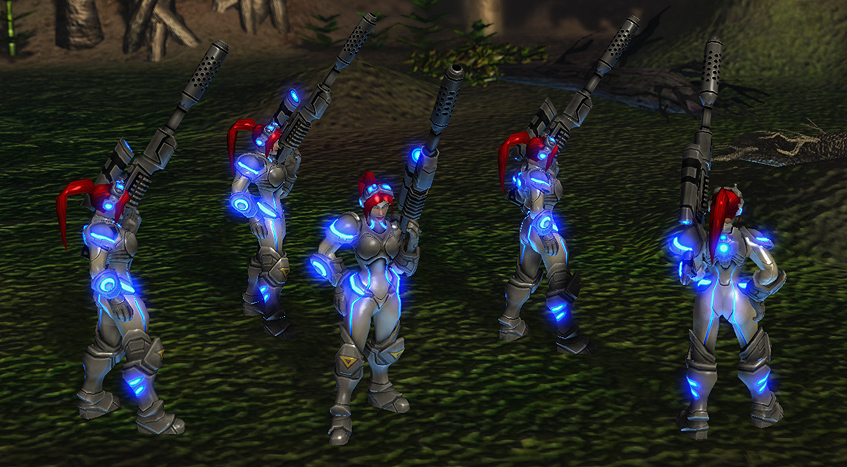
Sarah Kerrigan Ghost
Name: Sarah Kerrigan - Ghost
Version: 0.8
Author: Underp4ntz "Chrizz"
Site: www.e-studios.eu
Team: CareNut Development Team
Note: Feel free to use it in your Custom Maps, Let us know if you like it, And DONT forget to Credit "Underp4ntz".
Includes: Models, Textures, Portrait, 2x Alternative Hero Icons, 2x Alternative Build Icons, Healt "Wireframe" Icon
Requests & Suggestions: http://www.sc2mapster.com/teams/carenut-development-team/

Warning: Do not edit and Re-Publish this Model!
This Model Uses Nova's Character Model and Sculped back to Sarah Kerrigan.
Sarah Kerrigan Forum Topic: http://forums.sc2mapster.com/resources/art-assets/9315-released-sarah-kerrigan-ghost/
How to Import / Install: Make sure you have the directory structure like the screen below, Save and restart the editor.

Comments


-

_ForgeUser4253886 Owner
-
View User Profile
-
Send Message
Posted Apr 14, 2013Hey, thanks for doing this. I would like to ask if anyone can redo the instructions for import and install. I'm trying to do the directory structure, but I really have no idea how to make it work.
Thanks!
-
View User Profile
-
Send Message
Posted Jan 13, 2012I'll think of a use for this.
By the way, I cannot seem to get this damn thing to work. I tried importint it and it didn't wann work.
-
View User Profile
-
Send Message
Posted Aug 13, 2011Looks amazing, I wanna to see in a map, good work pal.
-
View User Profile
-
Send Message
Posted Jun 13, 2011I'm trying to use Sarah and Warfield but Sarah just appears red with a slight glow look while warfield is the same but blue. Any idea how to fix this? They both look amazing.
EDIT: I feel stupid. Just remembered somewhere someone told me that if I go to the file and choose one of the maps at the bottom that it would open the backup or something like that, not the saved one. So I try opening the saved one and it works. I feel really stupid now. Finally I can use Sarah Kerrigan in all her glory. Thanks for the model, it looks fantastic.
-
View User Profile
-
Send Message
Posted May 19, 2011@DrSuperEvil: Go
Much much diffirent from Nova, other gun with silencer shoulder pads some body tweaks and gear tweaks.
-
View User Profile
-
Send Message
Posted May 9, 2011So how is the model different from a reskinned nova? All you would need to do is use the Texture Select By Id event and you could skip having to import the model.
-
View User Profile
-
Send Message
Posted May 6, 2011I'm still figuring things out here. I Imported Sarah just like you've got her there aside from Sarah.m3 at the bottom of the list but still linked to Units. I saved as, "Sarah Kerrigan.SC2Map" is this right?
-
View User Profile
-
Send Message
Posted Mar 19, 2011Amazing! Thanks so much! Will be using in my survival map. Works great btw.
-
View User Profile
-
Send Message
Posted Feb 5, 2011Hey, noob alert I'm self teaching myself this editor and I guess I'm running into all the noob mistakes. I go to import the file
yet when I try to even find the file under browse it's not showing up. Any of the skilled editors know what to do to point me in the right direction?-
View User Profile
-
Send Message
Posted Nov 28, 2010when i download the m3 and import it she comes up as a texture-less pink model could you explain how to fix this
-
View User Profile
-
Send Message
Posted Oct 23, 2010Ok, so i have the same screenshot as you, and I saved the import page, and reopened it using the file I saved with, now what do I do?
-
View User Profile
-
Send Message
Posted Oct 6, 2010Awesome model! Thanks for sharing!
-
View User Profile
-
Send Message
Posted Oct 1, 2010Greetings thanks for the model it looks great.
But I'm having trouble with importing it. My import screen looks the same as yours. Only that Sarah.m3 under units, not in the map units but just underneat it and that I renamed the map units to Sarrah becouse I got general warfields model too ad hes map also calls 'units'
But the sarah model doesn't have any texures and is just red/bleu looking.
-
View User Profile
-
Send Message
Posted Sep 9, 2010Hi,
Just a heads up, I used your model in my map: Big Game Hunters (campaign units) because I like it so much. Thanks!
-
View User Profile
-
Send Message
Posted Sep 7, 2010Thats probally when she becomes cloaked, Cloak effects are Particles & Ribbons, Wich is not supported by the Exporter yet. I hope NiN or Blizzard released a M3 exporter that supports Particles & Ribbons
-
View User Profile
-
Send Message
Posted Sep 6, 2010Sarah shows up fine in the editor, but when you play the game she's just a glowing red silhouette. Can you help me?
-
View User Profile
-
Send Message
Posted Sep 3, 2010Thank you so much for this model! Now I can finally use her in Heart of the Swarm!
-
View User Profile
-
Send Message
Posted Sep 2, 2010ok nvm my previous comment, i got it to work and again nice model bro :D
-
View User Profile
-
Send Message
Posted Sep 2, 2010Wow thanks! my map will be awesome !! :D
-
View User Profile
-
Send Message
Posted Sep 2, 2010ok well, i changed novas model to sarahs, but when i click on nova to place her, she still appears as herself. would it be possible for you to show me step by step what you did with some screen shots? if so that would be great. and sorry for putting you through so much trouble XD