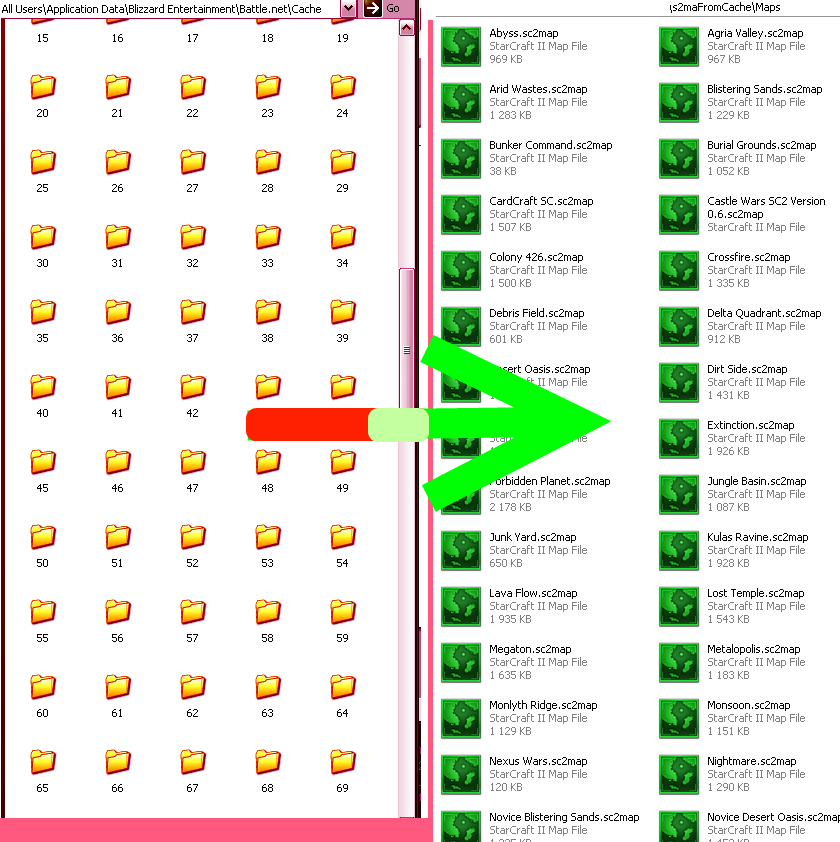
s2maCache Manager
Cache -> Maps tool.
r6
Default: Prints cachefolder path.
Option 1: Prints mapnames and locations from local cachefiles
- Find all *.s2ma files from the cachefolder.
- Using MpqLib to open the s2ma files.
- Get mapname without using locale ( ugly hack read from MapScript.galaxy autogenerated comments )
- Print Mapnames plus location
- repeat 4 until all valid maps have been printed.
also has an option to sort by Creation date.
Option 2: Copy cache maps to .\Maps and renaming them to <mapname>+<Creation date>.sc2map
- Find all *.s2ma files from the cachefolder.
- Get mapnames without using locale using MpqLib.
- Copy the .s2ma files to .\Maps and rename them to mapname.sc2map.
Option 3:
Same as Option 1, but does not print the mapnames( only locations ). Also has an option to print raw locations.
What may be coming:
- Save locations to file.
- Smaller size of application by integrating a new mpqlib made by myself.
By Borgen
Comments

-

_ForgeUser4788403 Owner
-
View User Profile
-
Send Message
Posted Nov 10, 2014What programming Language its written in?
-
View User Profile
-
Send Message
Posted Aug 13, 2013As i said to somebody in a pm:
Im guessing my program is not that compitable with the Arcade patch and/or different patches/expansions. I orginally made the program when sc2 was in beta-ish
If you run into error loading an error loading components, you can try to create a new map, then use the ComponentList.SC2Components that comes with that. the are almost always the same. Although you may need to use an mpq-openener software to modify the map..
I have not looked into why option 2 crashes or some maps are not extracted. I do not know when or if i will fix some bugs, but if some coder wants to continue i can send him the sourcecode. The program is very very simple though.
-
View User Profile
-
Send Message
Posted Aug 8, 2013How to download.
-
View User Profile
-
Send Message
Posted Jul 3, 2011hi. it's very interest project, but i have problem with custom maps. I want to open many maps with any tricks included (such as interface like star jawelled, poker defence), but galaxy cant open this (core error with loading components). How can i open this maps?
-
View User Profile
-
Send Message
Posted May 13, 2011Hi,
Can anyone teach me how to run this? I really have no idea how to make this work at all. How do you use MpqLib to open the *.s2ma files? The MpqLib.dll can't run for me. Sorry if this is a noob's question.
Thanks.
-
View User Profile
-
Send Message
Posted Jan 5, 2011-
View User Profile
-
Send Message
Posted Jan 5, 2011@Alex06 Yes, my errorhandling seems pretty crappy. For example if a map has some unsupported characters by windows file management, it would probably crash. If there is a error in opening the mapfiles for filenames, The other files will crash. I should rewrite this system. Thus if there is any error with mpqlib, it will crash.
Have you tried to use option 1 with date sort? Atleast it gives some info to go on.
-
View User Profile
-
Send Message
Posted Jan 4, 2011-
View User Profile
-
Send Message
Posted Dec 30, 2010New version uploaded. Hopefully fixes the application. Also all the maps have an unique identifier, though temporary it is the file creation date. Works for now.
-
View User Profile
-
Send Message
Posted Dec 17, 2010@topsen17
Yes, its a little broken right now. If you use the maplisting, you can see that it detect most of the maps, though something prevents it doing what it is supposed to do. I will see if i can put up a new rev soon.
Edit: Yeah, out of around 170 detected maps, only around 13 gets copied. Will see what i can do. Also if you use option 1, its kinda a bummer that the console windows flushes a lot of maplocations.
-
View User Profile
-
Send Message
Posted Dec 16, 2010First its a very useful tool. But it doesn't find every map or at least not the one i need. Also when I do option 2 I get like 5 maps but I have definitively more than 100...
-
View User Profile
-
Send Message
Posted Oct 5, 2010There is currently a problem with mpqlib, cannot idenfify it yet - but printing out names seems to be unstable. Also there is a problem with outputting files if the files exist.. It ignores all of the other files if such a case happens. Which is frequent. The second problem is fixed, but the first one is harder. Will see if a new version is up soon.
-
View User Profile
-
Send Message
Posted Aug 20, 2010Thanks for this cool tool theb0rg,
In regards to complaints, you do not need this tool to do it.
-
View User Profile
-
Send Message
Posted Aug 14, 2010@Mamick
Sure, i can do that. Adding a new alternative on option 1.
EDIT: Done and uploaded. Will probably use creation date as an unique identifier later.
-
View User Profile
-
Send Message
Posted Aug 14, 2010Is it possible to list the maps according to date of creation? It gets inconvenient to search through multiple version of 100+ maps to find the one I need.
-
View User Profile
-
Send Message
Posted Aug 12, 2010New version online that supports x64 and also adds some new useless features : )
-
View User Profile
-
Send Message
Posted Aug 7, 2010Okey, i can reproduce exactly the same problems if i remove the MpqLib.dll. I probably did find the path correctly, it seems like my mpqlib doesnt work that well with x64. I will see if i can get a x64 compatible version up or some other library.
-
View User Profile
-
Send Message
Posted Aug 7, 2010@GXSigma
The cachefolder seems to be at "C:\ProgramData\Blizzard Entertainment\Battle.net\Cache\" at Windows 7. ProgramData is apperently the same as AllUsers user at WindowsXP. Try out this build: Here and see if it work better.
-
View User Profile
-
Send Message
Posted Aug 6, 2010I'm getting exactly the same problem as junkage2. Running Windows 7 Professional 64-bit.
Where exactly is the cache folder? That's all I really need to know.
-
View User Profile
-
Send Message
Posted Aug 4, 2010@junkage2
Can you check your pm? Some questions if you do not mind. It seems to find the maps but for some reason cant open them.